


Here’s something most engineers won’t say out loud: a huge chunk of the workday has nothing to do with actual engineering.
It’s spent hunting through unfamiliar repositories, deciphering cryptic error logs, rebuilding the same scaffolding for the tenth time, and juggling a dozen mental threads at once. The real work (system design, architectural decisions, creative problem-solving) gets squeezed into the leftover hours.
AI coding assistants were supposed to fix this. Most just delivered fancier autocomplete handy for finishing a line of code but lost the moment a task required understanding intent.
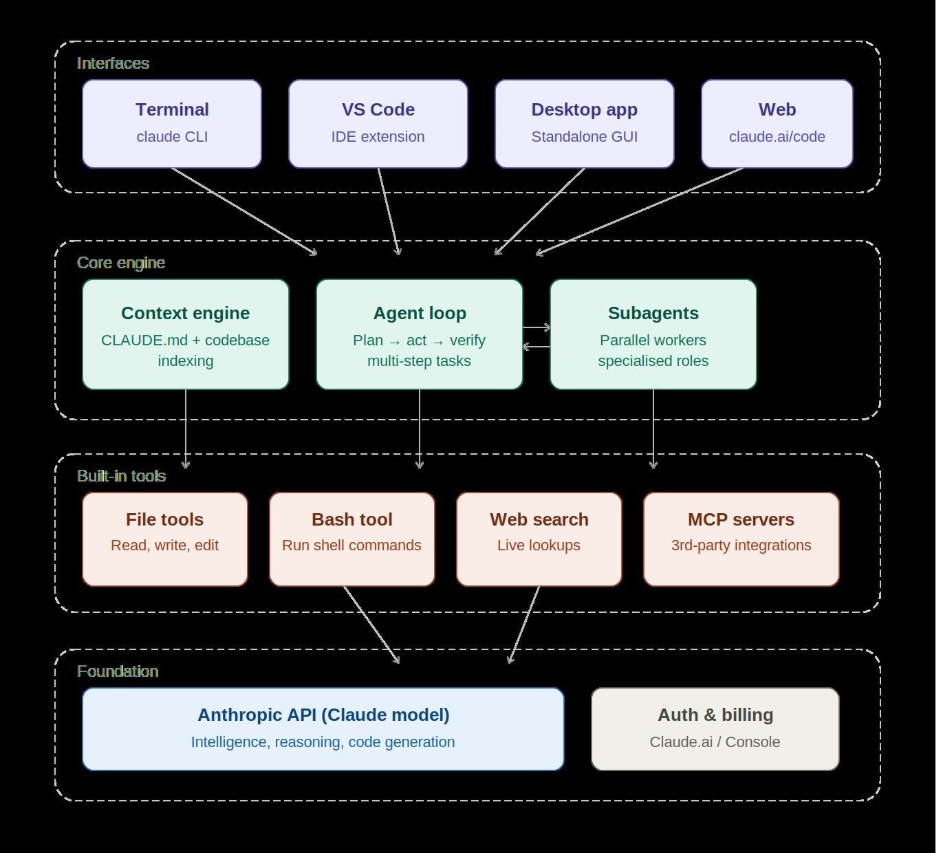
Claude takes a different approach. Through Claude Code, it functions as an agentic coding assistant that lives in your terminal and IDE, reads across your entire codebase, and carries out multi-step work on your behalf, not just predicting your next keystroke, but actually doing the task alongside you. Teams adopting it report development cycles running 30-60% faster. Inside Anthropic itself, the share of usage devoted to full feature implementation nearly tripled over six months, as engineers handed off increasingly complex work to it.
Numbers like that only go so far, though. The clearest way to understand the impact is to compare a workflow without Claude to the same workflow with it. So let’s walk through five common scenarios.
Scenario 1: Getting Up to Speed on an Unfamiliar Codebase
Without Claude
You’ve just joined a team or inherited an open-source project. There are 80-plus files, no onboarding doc in sight, and the last useful comment dates back to 2021.
Your first two days look something like this:
- Cloning the repo and getting it running (an hour or two if you’re lucky, much longer if dependencies break)
- Manually tracing execution from main.py or index.js, file by file
- Grepping around to find where a given feature actually lives
- Hoping a senior teammate has time to walk you through the architecture
- Scribbling notes in a doc you’ll probably never open again
By the end of day two, you’ve got a fuzzy mental map and three new questions for every one you managed to answer.
With Claude
Run /init in your terminal, and Claude Code scans the entire codebase to generate a CLAUDE.md file. It’s an architecture summary covering key directories, naming conventions, command references, and how modules connect.
From there, you can simply ask:
“What happens when a user submits the checkout form? Walk me through the flow end to end.”
Claude maps it out for you: frontend handler, API call, validation middleware, database write, email trigger, all in plain language, with file references attached.
Onboarding that used to eat two full days now takes about two hours, freeing up mental bandwidth for actually building something.
Scenario 2: Tracking Down a Stubborn Bug
Without Claude
Your CI pipeline fails with something unhelpful like TypeError: Cannot read properties of undefined. The usual drill follows:
- Reproduce it locally (15 to 30 minutes)
- Sprinkle console.log statements across five different files
- Rerun the tests. Wrong spot. Move the logs.
- Eventually trace it to a race condition inside an async function
- Search Stack Overflow for a matching pattern
- Apply a patch, rerun tests, break something else
- Repeat
Total time spent: two to four hours for what turns out to be a three-line fix.
With Claude
Paste the error and the stack trace. Claude Code reads the relevant files in context, pinpoints that the async function is resolving before a dependent value is ready, explains why it’s happening, and proposes a corrected fix.
You review it, apply it, tests pass.
Total time: about 20 minutes, with the remainder going toward writing a test that would have caught the issue earlier, which Claude can also help draft.
Scenario 3: Writing Boilerplate and Scaffolding
Without Claude
You need a new REST API endpoint. It’s a pattern you’ve written fifteen times already, but you still have to:
- Copy an existing endpoint as a starting point
- Carefully rename every variable
- Wire it into the router
- Write the validation schema
- Add the database query
- Write unit tests
- Update the API docs or OpenAPI spec
It’s necessary work that no developer particularly enjoys. It takes roughly an hour when everything goes smoothly, longer if one small detail slips through.
With Claude
You describe the task directly:
“Add a POST /api/v1/orders endpoint. It should accept customer ID, product IDs, and quantities. Validate input, write to the orders table, and return the created order with a 201. Follow the same pattern as the existing /api/v1/products endpoint.”
Claude Code reads the existing endpoint, matches its conventions, and generates the route, validation, controller logic, database call, and a matching test file. All of it in under two minutes.
You review the output (always worth doing) and make any small adjustments. Done.
A 60-minute task becomes a 10-minute one. Across an entire sprint, that adds up to meaningful time reclaimed for work that actually requires judgment.
Scenario 4: Refactoring Legacy Code
Without Claude
Technical debt is real. A 400-line function handles six different responsibilities, has zero test coverage, and nobody wants to touch it. Refactoring it properly means:
- Figuring out exactly what it’s doing, without the safety net of tests
- Identifying where it’s safe to split
- Pulling out functions one at a time
- Writing tests after the fact to confirm nothing broke
- Getting a reviewer up to speed on all of the above before they can sign off
This is the kind of work that quietly gets postponed quarter after quarter.
With Claude
You ask:
“Refactor processOrderBatch() in orders/processor.js. It’s doing too much. Separate the validation, transformation, and persistence concerns into distinct functions. Write unit tests for each. Keep the external interface the same.”
Claude reads the function, identifies natural boundaries, proposes the split, writes the refactored code, and adds tests for each new function. Along the way, it flags two edge cases that weren’t being handled.
You review the diff. It’s clean, clearly named, and testable. The code review conversation shifts from “what does this even do” to actual design decisions.
Scenario 5: Coordinating Work Across Multiple Files and Agents
Without Claude
A new feature typically spans several layers: a UI component, an API endpoint, a database migration, updated tests, updated docs. Keeping it all consistent while bouncing between files is exactly where bugs and mismatches slip in.
With Claude
Claude Code supports multi-agent workflows, letting you spin up specialized sub-agents for distinct roles: one on backend logic, one running a security pass, one checking test coverage. Each operates with a focused context, which means less noise and more precision.
The result is parallel execution of work that would otherwise have to happen sequentially. Architecture decisions, implementation, and review move forward together instead of one slow handoff at a time.
The Real Shift: Less Overhead, More Thinking
Across every scenario, the pattern is the same: Claude doesn’t replace developer judgment. It strips away the overhead that gets in the way of using it.
The hours spent reading unfamiliar code, writing boilerplate, chasing bugs through logs, and holding context across a dozen open tabs aren’t the hard parts of software engineering. They’re the expensive parts: the ones that drain the mental energy needed for system design, product trade-offs, and the decisions that actually matter.
Anthropic’s internal usage data tells a similar story. Over six months of tracking, engineers began assigning increasingly complex tasks to Claude Code while providing less direct oversight. Not out of carelessness, but because the tool earned that trust. Task complexity climbed. The number of back-and-forth turns needed from humans dropped.
That’s not a tool replacing developers. It’s a tool pushing developers toward operating like senior engineers: focused on what matters, with everything else delegated.
Getting Started with Claude Code
Setup takes under five minutes. Claude Code runs in your terminal and integrates directly with VS Code. Pick whichever install method fits your setup:
macOS / Linux: native installer (recommended, no Node.js required)
curl -fsSL https://claude.ai/install.sh | bash
macOS: Homebrew
brew install claude-code
Windows: PowerShell (native installer)
irm https://claude.ai/install.ps1 | iex
Windows (WSL) or any platform: npm (requires Node.js 18+)
npm install -g @anthropic-ai/claude-code
Once it’s installed, head to your project directory and run:
claude
The first run walks you through a quick browser-based sign-in with your Anthropic account. After that, the first move in any project is running /init. It scans your codebase and builds the CLAUDE.md file that everything else builds on.
Final Thought
Claude doesn’t make you a better developer by doing the hard parts for you. It makes you better by handing back the time and mental space to actually think: to design more deliberately and focus on the work that deserves your full attention.
The developers getting the most out of it aren’t treating it as a black box. They’re the ones giving clear direction, reviewing every output critically, and knowing exactly when to push back. It’s less a shortcut and more a force multiplier, one that amplifies whatever you already bring to the table.
If you haven’t tried Claude Code yet, the barrier to entry is low. If you have, you already know there’s no going back to the old way of working.
About the Author
Joshua Salema is an Engineering Manager – Digital at Zimetrics, where he drives the strategy, growth, and delivery of cutting-edge digital solutions. With deep expertise in architecture and technology leadership, he ensures the design and implementation of secure, scalable, and future-ready systems that align with business goals. Joshua partners with clients and cross-functional teams to translate vision into execution, fostering innovation while upholding architectural best practices. Beyond his core role, he is passionate about mentoring talent, shaping high-performing teams, and contributing to the broader digital technology community through thought leadership and industry engagement.
